If you’ve ever opened Google Ads and found a 20% spend jump with no obvious change, you know the real problem isn’t “optimization.” It’s time: time to spot what changed, time to trace the cause, and time to turn that into a clean, low-risk fix.
A Google Ads AI agent is built for that loop. It connects to your account, reads performance and configuration data, flags what looks off, and drafts specific actions for you to review. The best ones stay safe by default (read-only until you approve), so you get speed without handing over the keys.
This article explains how a Google Ads AI agent actually works, where it fits compared with Smart Bidding and scripts, what it can do inside an account, and when you should avoid using one because your tracking or data can’t support reliable recommendations.
How Does a Google Ads AI Agent Work?
An “always-on account operator” needs two things to work: safe access to your ad data, and a repeatable loop that turns signals into actions you control.
The Typical Workflow, Step by Step
- Connect the account: You grant access via the Google Ads API (often through a Google sign-in flow). Many teams connect an MCC (manager account) so the agent can cover multiple client accounts.
- Read performance and configuration data: The agent pulls entities (campaigns, ad groups, keywords, ads, assets, audiences), settings (bidding, budgets, locations), and results (impressions, clicks, cost, conversions). Some agents also read Google Analytics 4 for on-site behavior and conversion context.
- Normalize and validate: The agent checks basics like conversion tracking consistency, attribution settings, and whether recent edits explain performance changes. If tracking is broken, recommendations should pause until measurement is trustworthy.
- Detect patterns and anomalies: It looks for waste and risk (irrelevant search terms, sudden spend spikes, budgets capping early, disapproved ads, broken landing pages), plus opportunities (strong queries to add as keywords, weak RSAs, underused assets).
- Draft recommended actions: Good agents output concrete changes, not generic advice. Example: “Add these 27 search terms as exact-match negatives in Ad group X” or “Raise Budget Y to keep Impression Share from collapsing before noon.”
- Human approval and execution: You approve, edit, or reject. Some tools stay read-only by default and apply changes only after explicit confirmation, which keeps accountability clear.
- Ongoing routines and reporting: The agent reruns checks on a schedule (daily pacing, weekly search term review, monthly structure audit), sends alerts, and produces client-ready summaries that explain what changed and why.
Under the hood, most agents rely on the same foundation: the Google Ads API and its query language, GAQL. Google documents these interfaces in its Google Ads API guides.
AI Agent vs Google Ads Smart Bidding vs Scripts: What’s the Difference?
GAQL and the Google Ads API give you access to data and change endpoints. What you build on top of that matters. Smart Bidding, scripts, and AI agents automate different layers of work, and they carry different failure modes.
| Dimension | Google Ads AI Agent | Google Ads Smart Bidding | Google Ads Scripts |
|---|---|---|---|
| Primary Job | Account operations: audit, diagnose, propose changes, monitor, report | Set bids in auctions to hit a goal (CPA, ROAS, conversions) | Run rule-based automations and checks you code |
| Scope | Cross-campaign and cross-surface, can touch keywords, ads, budgets, negatives, reports | Bidding only (within the strategy you choose) | Whatever you script, usually narrow and task-specific |
| Control | Typically approval-based, can stay read-only by default | Google controls bid decisions inside the strategy | You control the logic and thresholds |
| Setup Effort | Connect account, set guardrails, review suggestions | Pick a strategy, set targets, keep conversion tracking clean | Write, test, schedule, maintain code |
| Typical Risks | Bad suggestions if tracking or naming is messy, wrong approvals can scale mistakes | Target too aggressive, wrong conversion action, learning swings | Bugs, API changes, logic errors, missed edge cases |
| Best For | Teams that want consistent audits, faster analysis, and safer change workflows | Accounts with stable conversion signals and enough volume | Repeatable rules like pausing ads, labeling, scheduled reports |
Smart Bidding is a feature inside Google Ads. It decides bids per auction using signals Google has, then it optimizes toward a target you set. It will not write RSA assets, mine search terms, or draft a client narrative.
Scripts are automation glue. They excel at deterministic tasks like “if spend exceeds X, email me” or “pause keywords below Y CTR,” but you own the code and the maintenance. Google documents the environment in its Google Ads Scripts guides.
An AI agent sits above both. It can recommend switching bidding strategies, then explain the expected tradeoffs and queue the change for approval. Tools like Roger usually keep access read-only by default and apply changes only after you confirm them.
What Can a Google Ads AI Agent Actually Do in Your Account?
Most teams want the agent to stay read-only until they approve changes. In that mode, a Google Ads AI agent still does a lot of valuable work: it finds issues, drafts the exact edits, and gives you a clean review queue.
High-Impact Tasks You Can Expect
- Search term mining: pulls converting queries from the Search terms report and suggests where to add them (new exact keywords, new ad groups, or a separate brand vs non-brand split). Example: it flags “crm pricing” as a strong query and proposes adding it as [crm pricing] with a dedicated RSA.
- Negative keyword drafting: identifies irrelevant or high-spend, zero-conversion terms and outputs ready-to-apply negatives at the right level (ad group, campaign, or shared negative list). Example: it suggests adding “free”, “jobs”, and competitor support terms as negatives when they burn budget.
- Budget pacing and cap alerts: monitors daily spend versus monthly budget and warns when campaigns run out early or underdeliver. Example: “Campaign A hits its daily cap by 11:20, Search impression share lost (budget) jumped, expect fewer conversions this week.”
- RSA and asset checks: reviews Responsive Search Ads for weak asset coverage (missing sitelinks, thin headlines, repeated messaging) and drafts replacement headlines and descriptions that match the top queries. It can also flag policy disapprovals and “Limited” ads for review.
- Landing page and tracking hygiene: detects broken final URLs, redirects, slow pages, or mismatched intent (query says “pricing”, page is a generic homepage). It can also spot conversion tracking gaps by comparing Google Ads conversions with Google Analytics 4 events.
- Change log and root-cause notes: explains performance swings by connecting results to edits (budget changes, new broad match, paused ad groups) and external factors (auction competition signals, seasonality patterns in your own data).
- Report drafts: turns account data into a weekly or monthly narrative with charts, wins, losses, and next actions. Agencies often use this to produce client-ready updates faster, then edit the commentary for tone.
Tools like Roger typically surface these items as specific actions you can accept, edit, or reject, so accountability stays clear.
When Should You Not Use a Google Ads AI Agent?
Approval workflows keep accountability clear, but you still need reliable inputs. If your data is thin, your tracking is messy, or your business rules are strict, an AI agent can produce confident-sounding suggestions that are directionally wrong.
Situations Where You Should Pause Automation
- Low-volume or brand-new accounts: If you only get a handful of conversions per month, query and audience patterns are mostly noise. Hold off on automated budget shifts, bid strategy changes, or aggressive negative keyword additions until you have stable conversion volume.
- Messy conversion tracking: If primary conversions mix leads, newsletter signups, and purchases, optimization becomes guesswork. Fix measurement first (conversion actions, values, deduplication, consent mode). An agent should flag tracking inconsistencies, but it should not “optimize” into bad data.
- Strict compliance and regulated claims: In industries with legal review (financial services, healthcare, alcohol, certain supplements), avoid any workflow that can publish ad copy or assets without sign-off. Keep the agent in read-only mode for audits and monitoring, then route copy changes through your compliance process.
- Volatile promotions and pricing: Flash sales, daily price changes, limited stock, or frequent landing page swaps can make historical patterns misleading. Use an agent for pacing alerts and anomaly detection, but review any recommendation that changes budgets, targets, or keyword match types during the promo window.
- Accounts with fragile structure: If naming conventions are inconsistent, campaigns mix objectives, or conversion actions differ by campaign, automation amplifies chaos. Standardize structure, labels, and goals first so recommendations map to the right intent.
- High-stakes changes with long recovery time: Large geo targeting edits, broad match expansions, or switching the primary bidding strategy can swing performance for weeks. Treat these as planned experiments with clear success metrics and rollback steps.
A good rule: automate monitoring and reporting early, automate execution later. Use an agent to surface issues fast, then earn trust with small, reversible changes.
How Roger Works as a Google Ads AI Agent (Safe by Default)
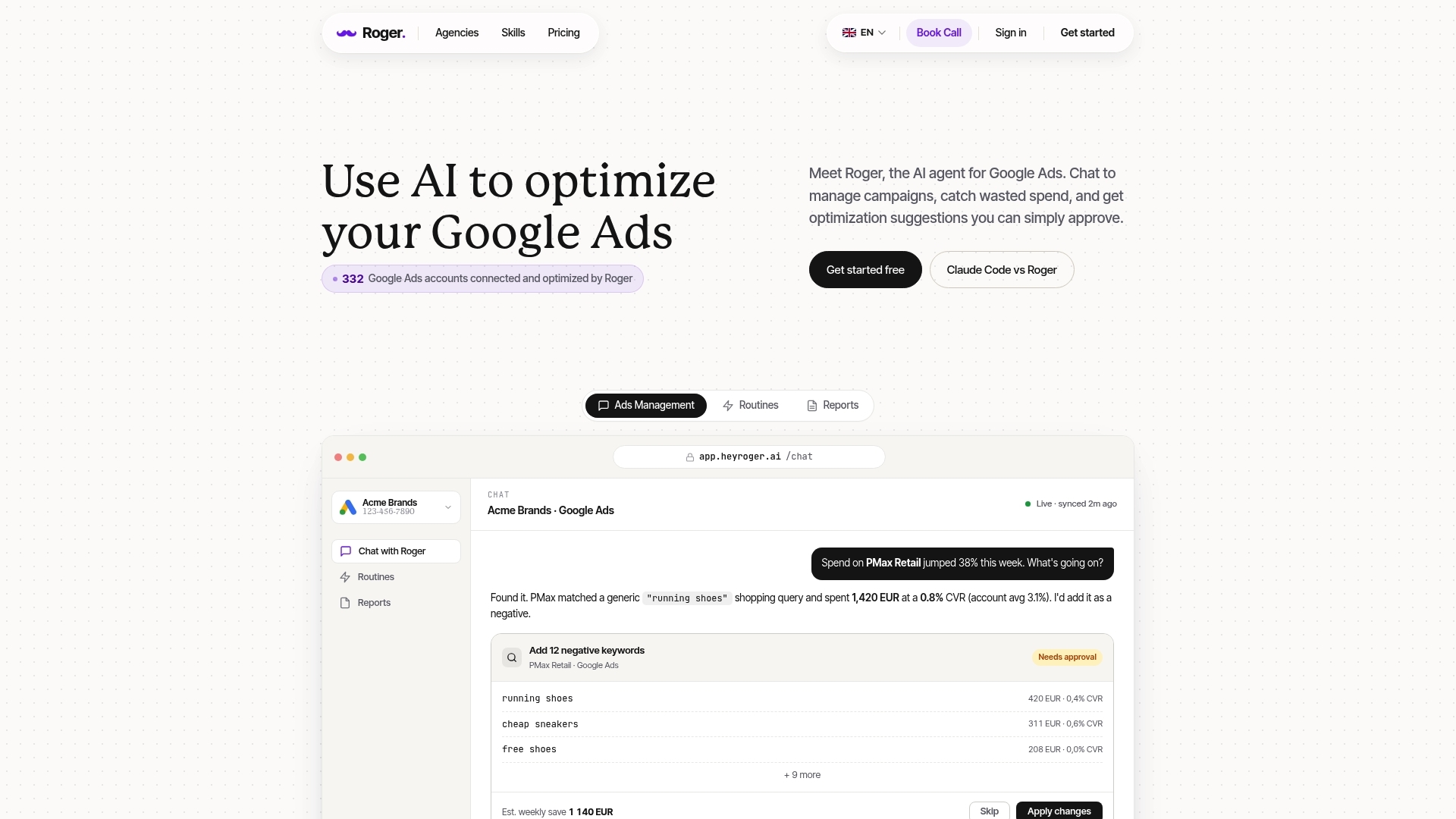
Small, reversible changes only work when the tool cannot “run away” with your account. Roger is built around that idea: it connects to Google Ads, reads what’s happening, and queues actions for you to approve. It starts with read-only access by default, so it can audit, monitor, and draft recommendations without the ability to publish edits.
What “Safe by Default” Looks Like in Practice
Roger typically follows a simple control loop that keeps accountability clear:
- Connect and read: You connect a Google Ads account or MCC via the Google Ads API. Roger reads campaign structure, settings, and performance data to understand what is driving spend and conversions.
- Audit and routines: Roger runs repeatable checks such as search term waste scans, missing asset coverage in RSAs, budget pacing, policy disapprovals, and landing page URL problems. You get a prioritized list, not a generic “health score.”
- Draft actions: When Roger recommends a change, it drafts the exact payload you would apply in Google Ads, for example a set of negative keywords scoped to the right campaign or ad group.
- Approval-based changes: You approve, edit, or reject. Roger applies changes only after approval, so a human stays responsible for what ships.
- Monitoring and reporting: Roger watches for anomalies (spend spikes, conversion drops, tracking gaps) and drafts weekly or monthly performance reports with a change log and plain-English explanations.
Access control matters as much as recommendations. Roger supports one-click revoke, so you can remove access immediately if needed. Teams often start with read-only, then expand permissions for specific, low-risk actions once they trust the workflow.
On privacy and compliance, Roger uses GDPR-aligned EU data residency and is CASA Tier-2 audited (Google’s Cloud Application Security Assessment). If you operate in Belgium or anywhere in the EU, EU data residency and clear permissioning reduce friction with internal legal, procurement, and client security reviews.
FAQ: Cost, Safety, Setup Time, and Access Permissions
Security reviews usually come down to four questions: what it costs, what it can change, how fast it pays back time, and what data it touches. Here are the practical answers teams ask before they connect an agent to Google Ads.
Common Questions
How much does a Google Ads AI agent cost?
Most tools charge a monthly SaaS fee, sometimes tiered by ad spend, number of accounts, or seats. Expect anything from a low monthly plan for a single account to higher tiers for agencies managing many accounts. If pricing scales with spend, ask for a cap so costs do not rise automatically during seasonal peaks.
How safe is it, can it change my account automatically?
A safe setup starts read-only, then adds execution only for specific actions you allow. Look for: explicit approval queues, granular permissions (budgets, negatives, ads, bidding), and a clear audit trail of who approved what. Google Ads access runs through standard roles in Google Ads and the Google Ads API, so you can revoke access at any time from your account settings.
How long does setup take?
For most accounts, connecting via Google sign-in and selecting an account or MCC takes minutes. The longer part is agreeing on guardrails: which conversion actions matter, which campaigns are off-limits, and what thresholds trigger alerts. You usually see first findings the same day because audits rely on existing history.
What data does it access?
Typically: campaign structure, settings, change history, search terms, ads and assets, performance metrics, and policy statuses. If you connect Google Analytics 4, it can also read events and landing page behavior. A well-run product states retention clearly. Roger deletes data within 30 days.
Who approves changes?
Your Google Ads permissions decide. In practice, teams route approvals to the account owner, an in-house lead, or an agency manager. Require named approvers for high-impact actions like bidding strategy changes, broad match expansions, or large budget moves.
Can agencies use it across clients?
Yes, most agents support MCC access so an agency can standardize audits, routines, and reporting across accounts. The best workflow keeps client accounts segmented, logs changes per account, and lets you disable execution client by client.
If you want to test this safely, connect an account in read-only mode, run one weekly search term review and one pacing alert routine, then approve only small, reversible actions until the recommendations consistently match how you operate.
