
A search campaign is stable at your target CPA… until you tick one box and your lead volume jumps while close rate quietly drops. That box is Search Partners, and it’s why the question should I enable search partners is really a question about measurement and risk.
Search Partners can add reach when Google Search is tapped out, and sometimes the CPCs look great. The tradeoff is less visibility into where ads show and a wider spread in intent. If your tracking stops at “lead submitted,” you can end up scaling the wrong thing.
This guide gives you a practical way to decide, based on what you can verify: how to tell when partner traffic is helping, how to run a controlled test with a stop-loss, and how to read the right segments in Google Ads and GA4 so “more conversions” doesn’t hide weaker outcomes.
- Enable when conversion tracking is clean and you can validate quality past the first conversion (CRM stages, call outcomes, offline imports).
- Disable when a budget shift away from proven Google Search queries would hurt, or when lead quality swings would blow up your economics.
- Test when you want incremental volume but need proof. Put a hard stop-loss in place (for example: pause if CPA stays 20% above target for 7 straight days).
What Are Search Partners in Google Ads, Exactly?
If you’re asking should I enable search partners, start with a simple fact: “Search Partners” changes where your Search ads can appear, which changes intent and lead quality.
Google Search Partners is Google’s extended search network. When enabled on a Search campaign, your ads can show on Google-owned properties beyond Google Search (for example, YouTube search) and on third-party sites and apps that run Google search ads. You still target keywords (or use broad match), audiences, locations, and bidding the same way. The difference is the inventory and the context around the query.
Google’s own help docs describe Search Partners at a high level, but they also make the main limitation clear: you do not get partner-by-partner placement control or visibility. See Google’s documentation: About the Google Search Network.
What Differs From Google Search (And What You Can’t Control)
Search Partners behaves like Google Search in setup, but it behaves differently in diagnostics and control.
- Less placement transparency: You can segment performance by “Search partners,” but you cannot see a list of partner sites or exclude specific partners.
- Different user context: A query on a partner site can come from a widget, toolbar, parked domain, or in-app search. The same keyword can carry weaker intent than on google.com.
- Limited brand safety controls: You can use negative keywords and brand exclusions where applicable, but you cannot apply the kind of placement exclusions you use on Display or YouTube.
- Reporting is aggregated: You typically diagnose issues via Network segmentation, search terms quality, conversion rate, and downstream lead validation, not by “which partner drove this.”
In practice, enabling search partners is less about extra settings and more about accepting that you are trading some control for incremental reach. That trade can be profitable when your tracking and lead quality feedback loop is tight.
When Does Search Partners Usually Win (And When Does It Fail)?
That “trade some control for incremental reach” is exactly why should I enable search partners has no universal answer. Search partners usually win when you need more qualified volume and your feedback loop can catch quality swings fast. It fails when partner traffic soaks budget without producing validated outcomes.
Signals Search Partners Is Likely to Win
- Google Search volume is capped: Your top non-brand keywords sit at high impression share and you still want more conversions. Search partners can add incremental impressions when Google Search inventory plateaus.
- Partner CPCs come in lower: You see cheaper clicks in the “Network (with search partners)” segment and conversion rate stays close to Google Search. Lower CPC only matters if CPA or ROAS holds.
- You optimize to real business outcomes: You import offline conversions (for example, “Qualified lead,” “Opportunity,” or “Sale”) from a CRM like HubSpot or Salesforce, or you use Google Ads Offline Conversion Imports. Smart Bidding handles partner traffic better when the conversion signal reflects revenue, not form fills.
- Your query mix is broad but controlled: You run tight match types, keep negative keywords current, and review search terms often enough to spot irrelevant patterns.
Practical green flag: after enabling, total conversions rise while CPA stays within your tolerance band (many teams use a 10 to 20% ceiling) and lead-to-sale rate does not drop.
Signals Search Partners Is Likely to Fail
- Lead quality varies wildly: You get more leads, but sales teams report wrong intent, junk details, or low close rates. This shows up as falling offline conversion rates even if Google Ads conversions look fine.
- Tracking is “soft”: You optimize to micro-conversions (pageviews, time on site, unqualified forms). Partner traffic can inflate these signals and push Smart Bidding in the wrong direction.
- You need strict placement control: Search partners gives limited transparency and limited partner-level controls. If brand safety is non-negotiable, disable or isolate via a test budget.
- Budget is tight: Partner traffic can steal spend from proven Google Search queries before you notice.
If you cannot measure quality beyond the initial conversion, treat search partners as a controlled experiment, not a default setting.
Which Campaigns Should Use Search Partners?
If you can’t measure quality past the first conversion, assume variance and ask a narrower question: should I enable search partners for this specific campaign type and intent? The right answer often differs between brand and non-brand, and between Search, Shopping, and Performance Max.
- Search (non-brand): usually test. Search Partners can add incremental queries and cheaper clicks, but it also widens intent. Test when Google Search impression share is capped (budget or rank) and your negatives and lead validation are solid.
- Search (brand): usually disable. Brand terms tend to pick up low-intent navigation traffic on partner inventory. If you must keep it on, watch brand CPC inflation and any drop in conversion rate.
- Shopping: depends on setup. Standard Shopping and Performance Max Shopping inventory behave differently. For classic Shopping growth, Search Partners can help when product demand exists but Google Search volume is limited. For tight-margin catalogs, keep it off until you can segment profitability by product or category.
- Performance Max: treat as “mostly yes, but measure”. You cannot toggle Search Partners the same way as Search campaigns, because Performance Max mixes inventory across Google surfaces. Your job shifts to measurement and guardrails (asset group structure, audience signals, brand exclusions where available).
Clear Yes/No Guidance by Goal
Enable (or keep enabled) when you optimize to sales or qualified leads, you import offline conversions (for example, “Qualified lead” from HubSpot or Salesforce), and you can tolerate week-to-week swings while the bidding strategy learns.
Disable when you run strict brand protection, you optimize to unqualified form fills, or you have a small daily budget that would get pulled away from high-intent Google Search queries.
Test first when you have mixed signals: lower CPC on partners but worse lead-to-sale rate, or higher conversion volume with higher CPA. In those cases, decide based on the metric that pays the bills (ROAS for ecommerce, lead-to-sale rate for lead gen), not on CTR.
How to Test Search Partners Without Burning Budget
If you’re asking should I enable search partners, treat it like a budgeted experiment with a stop-loss. The goal is simple: learn whether partner inventory adds profitable conversions without starving Google Search of spend.
A Controlled Test Plan (With Hard Guardrails)
- Pick one campaign and one objective. Start with a stable Search campaign (same offer, same landing page). Avoid mixing brand and non-brand in the same test if you can segment them.
- Set a fixed test budget. Create a separate Search campaign clone with identical settings and enable Search Partners only there, or run a time-based test on the same campaign. Cap daily budget so partners cannot run away with spend.
- Define success metrics before you start. Use primary metrics tied to profit:
- Ecommerce: ROAS, revenue, and conversion value per cost.
- Lead gen: CPA, plus lead-to-sale rate or “Qualified lead” rate from HubSpot or Salesforce.
- For both: conversion rate (CVR), average CPC, and search term relevance.
- Set a minimum duration and volume gate. Run at least 14 days and aim for enough conversions to reduce noise (many teams use 30+ conversions per variant as a practical floor). If you cannot hit volume, the test will not answer the question.
- Add stop conditions. Pause Search Partners if CPA rises above target by 20% for 7 straight days, or if qualified lead rate drops materially even when CPA looks fine.
- Control for seasonality. Avoid major promo periods and tracking changes. If you must test during volatility, extend the test window and compare to the same weekdays.
Smart Bidding tests work best when you feed Google Ads a strong signal, such as offline conversion imports for “Qualified lead” or “Sale,” instead of raw form fills.
How to Measure Search Partners Performance in Google Ads and GA4
If you’re deciding should I enable search partners, measure it like a separate channel. “More conversions” means nothing if partner clicks convert to weaker leads, or if tracking inflates results.
Segment Search Partners Inside Google Ads
Start in Google Ads reporting, not GA4. Google Ads is the source of truth for spend, bids, and the network split.
- Use Network segmentation: In Campaigns (or Ad groups), click Segment and choose Network (with search partners). Compare “Google search” vs “Search partners” on the same rows.
- Check efficiency first: CPC, conversion rate, CPA (or ROAS), plus impression share and lost IS (budget). Search partners often looks “cheap” on CPC, then breaks on CPA.
- Validate query quality: Open Search terms and filter by Ad network = Search partners (when available in your view). Look for irrelevant modifiers, job-seeker intent, freebie intent, and competitor-only patterns.
Interpretation rule: if Search partners has similar conversion rate but meaningfully worse CPA, partner intent is weaker or your landing page filters poorly.
Use GA4 to Sanity-Check Sessions and Post-Click Behavior
GA4 will not cleanly label “Search partners” the way Google Ads does, so use GA4 as a consistency check, not as the primary split. Compare Google Ads clicks to GA4 sessions, engagement rate, and key event rates for the same campaign and date range. Large gaps often point to consent mode effects, tagging issues, or redirect/landing page problems.
In GA4, review Advertising reports (and assisted conversions) to see whether partner-driven users show up as early touchpoints but rarely close. If assisted conversions rise while last-click performance collapses, treat that as a warning until you confirm with offline outcomes.
Tracking Reliability Checks That Matter
- Primary conversions: In Google Ads, keep “Primary” limited to outcomes you would pay for (purchase, qualified lead). Put softer events in “Secondary.”
- Offline validation: Import “Qualified lead” or “Sale” from HubSpot or Salesforce, or use Google Ads Offline Conversion Imports. Partner traffic often exposes weak lead scoring fast.
How Roger Flags Bad Search Partner Traffic Automatically
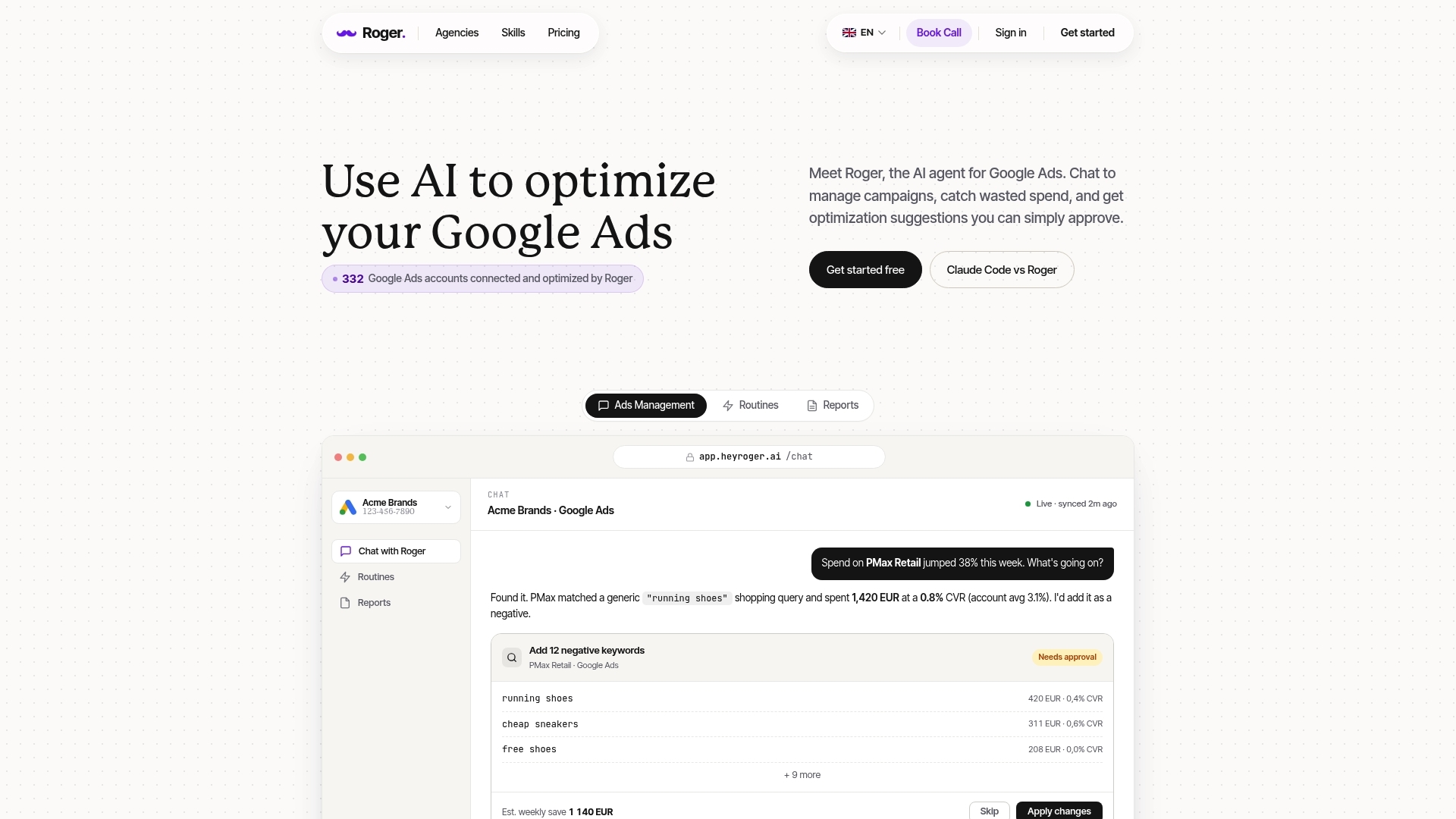
Assisted conversions can hide a problem: Search Partners brings volume, but the close rate can quietly fall. If you’re still deciding should I enable search partners, automation helps most when it watches the same quality signals you would, every day, without waiting for a monthly report.
Roger connects to Google Ads (and optionally GA4 and Google Tag Manager) and runs repeatable checks that isolate partner-driven risk. It does this without needing partner-by-partner placement lists, because it focuses on outcomes and patterns you can actually measure.
What Roger Checks When Search Partners Is On
- Network segmentation drift: Roger monitors the “Search partners” segment for CPA, ROAS, CVR, and CPC changes versus Google Search. When partner performance diverges past your thresholds, it flags the campaign.
- Anomaly and spend spike detection: If spend ramps faster than conversions (or conversion value), Roger alerts you early so partners do not siphon budget for days.
- Query quality and negatives drafting: Roger reviews search terms for irrelevant intent patterns and drafts negative keywords for approval. This matters because negatives are one of the few real control levers you have on partner inventory.
- Tracking reliability checks: Roger can spot sudden conversion rate jumps that look like tagging issues (for example, duplicate firing or broken thank-you pages) before Smart Bidding optimizes into bad data.
- Client-ready reporting: Roger produces a clear summary of partner vs Google Search performance, what changed, what was flagged, and what actions are recommended, ready to share.
Roger keeps changes approval-based, with read-only access by default and one-click revoke. Roger also uses GDPR-aligned EU data residency, which matters for many Belgium-based teams and agencies handling client accounts.
If you want a practical next step: set your stop-loss (for example, pause if CPA exceeds target by 20% for 7 straight days), enable Search Partners on one controlled test campaign, then let Roger monitor the partner segment daily and queue negatives and pauses for your sign-off.
