You flip on broad match, keep Manual CPC, and think you’re staying “in control.” Then you open the Search terms report a week later and find your budget went to queries you’d never approve, with CPCs creeping up and lead quality sliding.
Broad match without smart bidding can work, but it only works when you treat it like an operations system. You’re trading Google’s bid automation for your own guardrails: tight campaign isolation, disciplined search term reviews, a negative keyword strategy that doesn’t over-block, and hard limits that stop “learning spend” from turning into budget drift.
This guide shows how to run broad match on Manual CPC (with eCPC off) without losing the query discovery that makes broad match worth using. You’ll learn when this setup is a smart choice, how to contain risk so broad match doesn’t cannibalize your best terms, and how to keep monitoring manageable with alerts and draft changes that still require human approval.
When Should You Use Broad Match Without Smart Bidding?
Use broad match without smart bidding when you want query expansion but you cannot trust automated bidding to protect efficiency yet. This setup works best when you can commit to frequent search term reviews and you need tighter control over CPC, lead quality, or compliance.
Decision Checklist: Is This Setup Right for You?
- Conversion volume is low or noisy. If you get too few conversions per week per campaign, Smart Bidding has weak signals. Broad match with Manual CPC can still find demand while you build cleaner data.
- You have real lead-quality risk. If you sell high-consideration services (B2B demos, legal, medical, home renovation), broad match can pull in “research” queries. Manual bidding plus aggressive negatives helps you avoid paying premium CPCs for low-intent traffic.
- You need predictable spend. If daily budget swings cause operational issues (call center staffing, limited sales capacity), broad match under Smart Bidding can feel unstable. Manual CPC with isolated budgets keeps volatility contained.
- Compliance constraints limit what you can optimize for. In regulated verticals, you may need stricter control over query intent and ad messaging. Broad match can still work, but only if you can block sensitive themes quickly with shared negative lists.
- Your conversion tracking is not ready for automation. If you still have missing GCLID capture, offline conversion imports not implemented, or messy GA4 key events, fix measurement before you ask Smart Bidding to make pricing decisions.
- You have time for operational discipline. Broad match without Smart Bidding shifts work to humans: search terms triage, negatives, and budget checks. If you cannot review search terms at least weekly, choose phrase or exact instead.
If you answered “yes” to at least two items above, broad match with Manual CPC (and Enhanced CPC off) is a reasonable choice. Tools like Roger help by flagging high-spend, no-conversion queries and drafting negative keywords for approval, so you keep control while reducing the busywork.
How Do You Structure Campaigns to Contain Broad Match Risk?
Broad match without smart bidding becomes manageable when you isolate it. Put broad match in its own campaign (or at least its own ad groups) so you can cap budgets, read performance cleanly, and avoid broad queries stealing spend from proven exact and phrase terms.
A practical structure most teams can run looks like this:
- Campaign 1: Exact/Phrase “Core” (Manual CPC). This protects high-intent, known winners.
- Campaign 2: Broad “Discovery” (Manual CPC). This is where you accept messier query coverage in exchange for new demand.
- Optional Campaign 3: Brand. Keep brand separate so broad discovery does not distort brand CPA and lead quality reporting.
Within the Broad “Discovery” campaign, keep ad groups tight by intent theme, not by micro-variants. Example: “enterprise CRM,” “CRM pricing,” and “CRM implementation” deserve separate ad groups because the landing page, ad copy, and negative keywords differ.
Use Shared Negative Lists as Guardrails
Shared negative keyword lists are your safety rails. Build them in Google Ads under Tools and settings > Shared library > Negative keyword lists, then apply them to every broad match campaign.
- Account-wide junk list: “free,” “jobs,” “salary,” “template,” “definition,” “PDF,” competitor support terms, and other non-buying intent that always wastes spend.
- Compliance list (if needed): terms you cannot advertise against in regulated categories, plus disallowed claims.
- Cross-campaign negatives: add your exact and phrase “Core” keywords as negatives in Broad “Discovery” when you want clean reporting and budget separation.
For reporting, tag campaigns consistently (for example, “SRCH | Broad | Discovery”) and keep one budget per campaign. That makes it easy to show stakeholders what broad match discovered, what you excluded, and what it cost to learn.
Search Terms Reviews: The Exact Cadence and Triage That Works
Those clean campaign tags and isolated budgets only pay off if you review search terms with discipline. Broad match without smart bidding shifts control to your search terms routine: you decide what stays, what gets blocked, and what becomes a new theme.
Search Terms Review Cadence for Broad Match
Use two cadences, and keep them consistent:
- Daily (5 to 15 minutes): catch spend spikes, brand safety issues, and obvious mismatch intent.
- Weekly (45 to 90 minutes): do the real work: theme analysis, negative list hygiene, and expansion decisions.
In Google Ads, work from Search terms at the campaign level, then drill into ad groups when you see patterns. Sort by cost first. Relevance problems hide in high spend, not in long-tail clicks.
- Filter for risk first. Set a short date range (yesterday for daily, last 7 days for weekly). Filter for high cost and zero conversions, or high cost and weak lead signals if you use offline imports.
- Label intent fast. Put each query into one of four buckets: “buy now,” “solution research,” “jobs/education,” “support/free.” The last two usually become negatives immediately.
- Decide the action. For each bucket, pick one: add a negative, keep and watch, create a new ad group/theme, or adjust targeting (location, schedule, device) if the pattern is structural.
- Choose the negative match type on purpose. Use negative exact for a single bad query. Use negative phrase for a repeated theme (for example “free” or “template”). Avoid negative broad unless you are sure; it blocks more than most teams expect.
- Log what changed. Track three numbers weekly per broad campaign: cost on excluded queries, count of negatives added, and new converting themes discovered. Stakeholders understand “what it cost to learn.”
If you manage multiple accounts, Roger can flag high-spend, no-conversion queries daily and draft negative keyword lists for approval, so your weekly review becomes a decision session instead of a scavenger hunt.
How Do You Control CPC and Spend Without Smart Bidding?
When you run broad match without smart bidding, you need hard limits that stop “learning spend” from turning into budget drift. Manual CPC gives you that control, but only if you set explicit bid ceilings, isolate budgets, and react fast when search terms get noisy.
Start with a CPC cap that matches your unit economics. If a qualified lead is worth €200 and your landing page converts at 5%, your break-even CPC is €10 (200 x 0.05). Set initial max CPCs below that, then raise only on query themes that prove intent and conversion rate.
Manual CPC Guardrails That Actually Work
- Set a max CPC range per ad group: pick a floor and ceiling (for example, €2 to €6) based on expected intent. Keep “pricing” and “near me” themes higher than “what is” themes.
- Use device adjustments when the business model demands it. If phone leads are low quality, reduce mobile bids and keep desktop stable. If calls drive revenue, do the opposite.
- Use location targeting and location bid adjustments to prevent broad match from buying accidental reach. Tighten to the cities or provinces you serve, then bid down low-performing areas.
- Watch Search Impression Share as a sanity check. If you have low impression share due to rank, raising bids across the board is the wrong move. Fix query intent first with negatives and ad relevance.
Budget isolation matters more than people admit. Put broad match in its own campaign with its own daily budget. If broad match has a bad day, it should not steal spend from exact and phrase.
Use Google Ads Experiments to cap risk when you change bids or open new broad themes. Run a 50-50 split for 14 to 28 days, or until you see stable cost per conversion (or lead quality) differences.
For fast bleed control, set automated rules and alerts: pause keywords after X spend with zero conversions, email on daily cost spikes, and flag sudden CPC jumps. Roger can monitor these patterns across accounts and draft the exact bid and negative changes for approval.
The Contrarian Rule: Don’t “Mine Then Switch” Too Fast
Automated rules that pause waste fast are useful, but they can push you into the most common mistake in broad match without smart bidding: “mine a query from broad, then immediately move it to exact or phrase.” That move feels disciplined. It often shrinks reach, raises CPC, and slows learning because you remove the query from the broad keyword that was finding adjacent demand.
Broad match works like a net. When you pull one fish out too early, you also pull out the bait that attracted similar fish. Exact and phrase tighten eligibility, and in many accounts they also shift traffic into more competitive auctions. The result can be fewer impressions, a worse cost per lead, and a false sense that “broad stopped working.”
When to Graduate a Query to Exact or Phrase
Move a query out of broad only when you can prove it deserves dedicated control. Use criteria you can apply consistently:
- It repeats. You see the same query (or near-identical variants) across multiple days, not a one-off.
- It converts with stable intent. Conversions come from the same intent theme, and lead quality holds up in your CRM or offline conversion imports.
- You have enough spend to judge it. The query has meaningful cost and clicks, not one conversion on tiny volume.
- You can write a better ad and send to a better page. A dedicated ad group lets you match the query to specific copy and a specific landing page.
- You can protect it. You can set a Manual CPC cap that still wins auctions, and you can add negatives to keep it from drifting.
When you do graduate, keep the broad version running for at least 1 to 2 weeks. Add the new exact or phrase keyword into the Core campaign, then add that exact keyword as a negative in the Broad “Discovery” campaign if you want clean budget separation.
Roger helps here by surfacing repeat query themes and drafting the exact negatives needed for a controlled handoff, without auto-applying changes.
How Roger Helps You Run Broad Match Safely (Without Auto-Applying Changes)
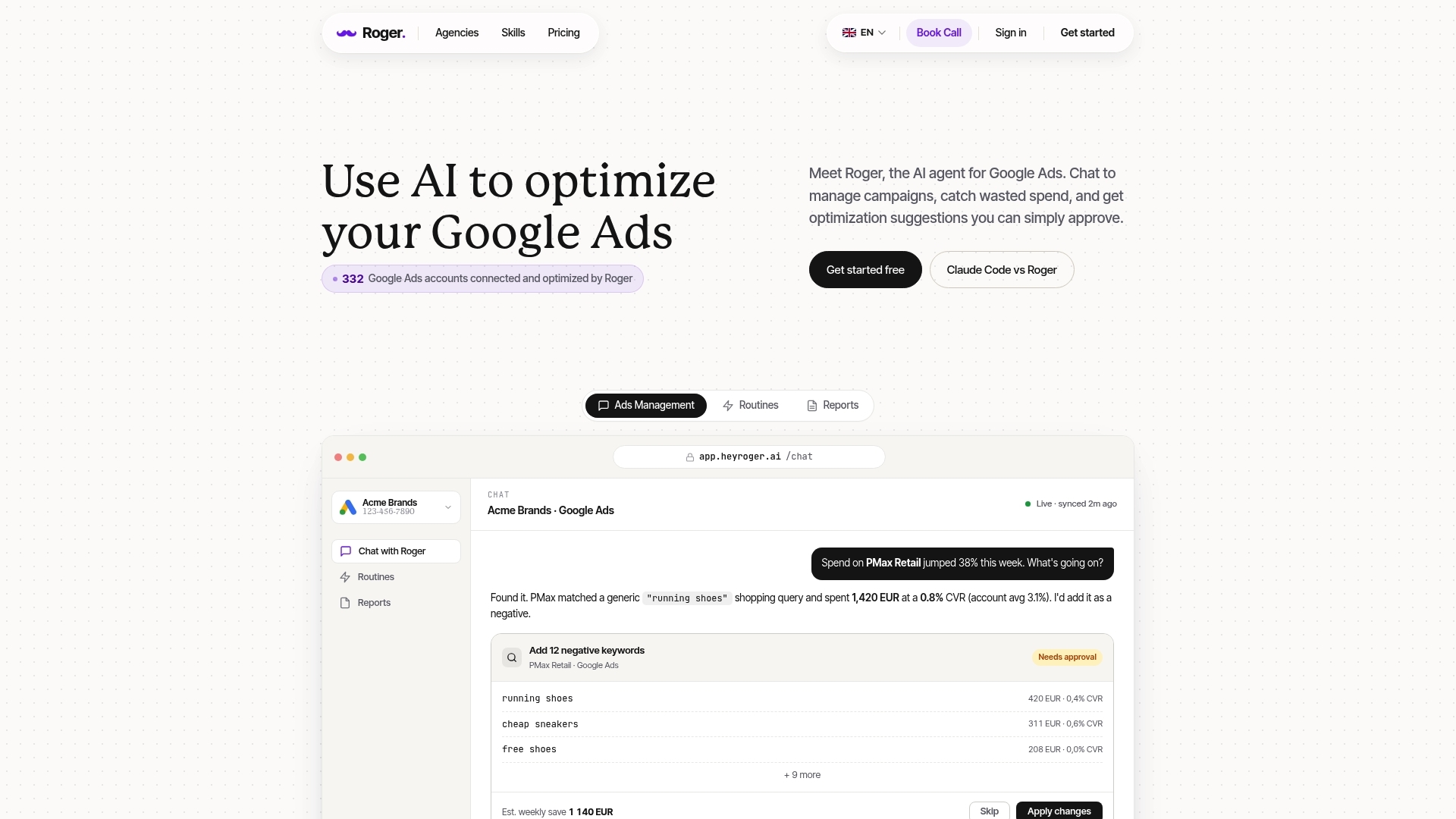
Broad match without smart bidding fails for one boring reason: humans miss patterns until the spend is gone. You can run this setup safely if you treat it like an operations problem. Roger is built for that workflow. It reads your Google Ads data, surfaces risk fast, and prepares changes for your approval, so you keep Manual CPC control without living in the Search terms report.
Roger focuses on four jobs that matter most in broad match management:
- Flag wasted spend early: Roger can identify high-cost queries, ad groups, or keywords with zero conversions (or weak offline-qualified outcomes if you import them). It prioritizes by cost and trend, so you fix the biggest leaks first.
- Draft negative keywords for approval: Roger groups repeat themes (for example “jobs,” “free,” “definition,” “template”) and proposes negative exact or negative phrase additions. You approve, edit, or reject before anything changes.
- Detect anomalies and spikes: Roger can alert you when daily cost jumps, CPC spikes, conversion rate drops, or impression share shifts. Broad match volatility is normal; silent volatility is expensive.
- Generate client-ready reporting: Roger can produce weekly or monthly summaries that show what broad match discovered, what you excluded, and what it cost to learn. That narrative reduces stakeholder panic when query coverage expands.
Governance That Fits Regulated And Agency Accounts
Roger runs with read-only access by default and uses an approval step before applying changes. That matters in regulated verticals and in agencies working under client permission constraints. You can also revoke access quickly, and Roger uses GDPR-aligned EU data residency.
If you want to make broad match controllable this week, start simple: connect one “SRCH | Broad | Discovery” campaign, ask Roger for a wasted spend audit, then approve a first batch of negative phrases. You will feel the workload drop within days, and your query coverage will get cleaner without handing pricing decisions to Smart Bidding.
