The fastest way to waste money on an “AI Google Ads tool” is to pick one that changes how your team works. Some tools act like an analyst: they spot issues, draft fixes, and wait for approval. Others act like an automation engine: you build the rules, maintain them, and live with the alerts.
- Pick Roger if you want an AI agent that audits accounts, drafts optimizations (like negative keywords and bid changes), monitors 24/7, and generates client-ready reports, with approval-first change control and EU/GDPR-aligned data residency.
- Pick Optmyzr if you want a mature PPC operations toolkit with deep automations, scripts, and optimization workflows for people who like configuring and tuning rules across accounts.
- Pick Adalysis if your biggest pain is Google Ads testing and ad creative hygiene, and you want structured A/B experiment management plus systematic checks for search ads.
This guide covers the real trade-offs: permission scope, who approves changes, how much “automation” turns into rule upkeep, and where each tool saves hours versus creating new chores. If you run multiple accounts, manage governance internally, or bill by the hour, the differences show up fast.
What Are AI Google Ads Tools, and What Should They Actually Automate?
“AI” in Google Ads tools usually means two things: machine learning that spots patterns in your account data, and automation that turns those findings into drafts, rules, or scripts. The value is consistency at scale. The risk is an “automation tax” if the tool creates noisy alerts or pushes risky changes.
Good AI PPC tooling automates work that is repetitive, data-heavy, and reversible. Keep humans on decisions that change strategy, messaging, or brand risk.
- Audits and hygiene checks: Detect broken tracking, disapproved ads, missing assets, search terms waste, budget caps, and structural issues across many campaigns.
- Monitoring and anomaly detection: Alert on spend spikes, conversion drops, tracking outages, or sudden CPA changes, ideally with context (what changed, which campaign, which query).
- Search terms and negative keyword drafting: Cluster queries, flag irrelevant intent, and propose negatives for approval. This is one of the fastest ways to reduce wasted spend.
- Bid and budget suggestions: Recommend bid adjustments or budget reallocations based on recent performance, seasonality windows, and constraints you set. Prefer approval-based workflows for safety.
- Reporting and commentary: Auto-generate weekly or monthly narratives, annotate performance drivers (brand vs non-brand, device, geo), and export to PDF or share links.
What You Should Keep Human
Keep humans responsible for the parts that require judgment, context, and accountability:
- Account strategy: campaign structure, match type approach, Performance Max boundaries, and how you separate brand from prospecting.
- Creative and claims: RSA messaging, landing page alignment, and any regulated wording. Tools can suggest variants, but you own compliance.
- Measurement design: what counts as a conversion, attribution choices, and GA4 event hygiene. Bad inputs create confident wrong outputs.
- Governance: who can approve changes, what requires review, and how you document decisions for clients or stakeholders.
If you want automation without surrendering control, look for read-only defaults, clear permission scopes, and approval-first changes. Google explains permission levels in its Google Ads access and security documentation.
How Roger Works (AI Agent + Approval-Based Changes)
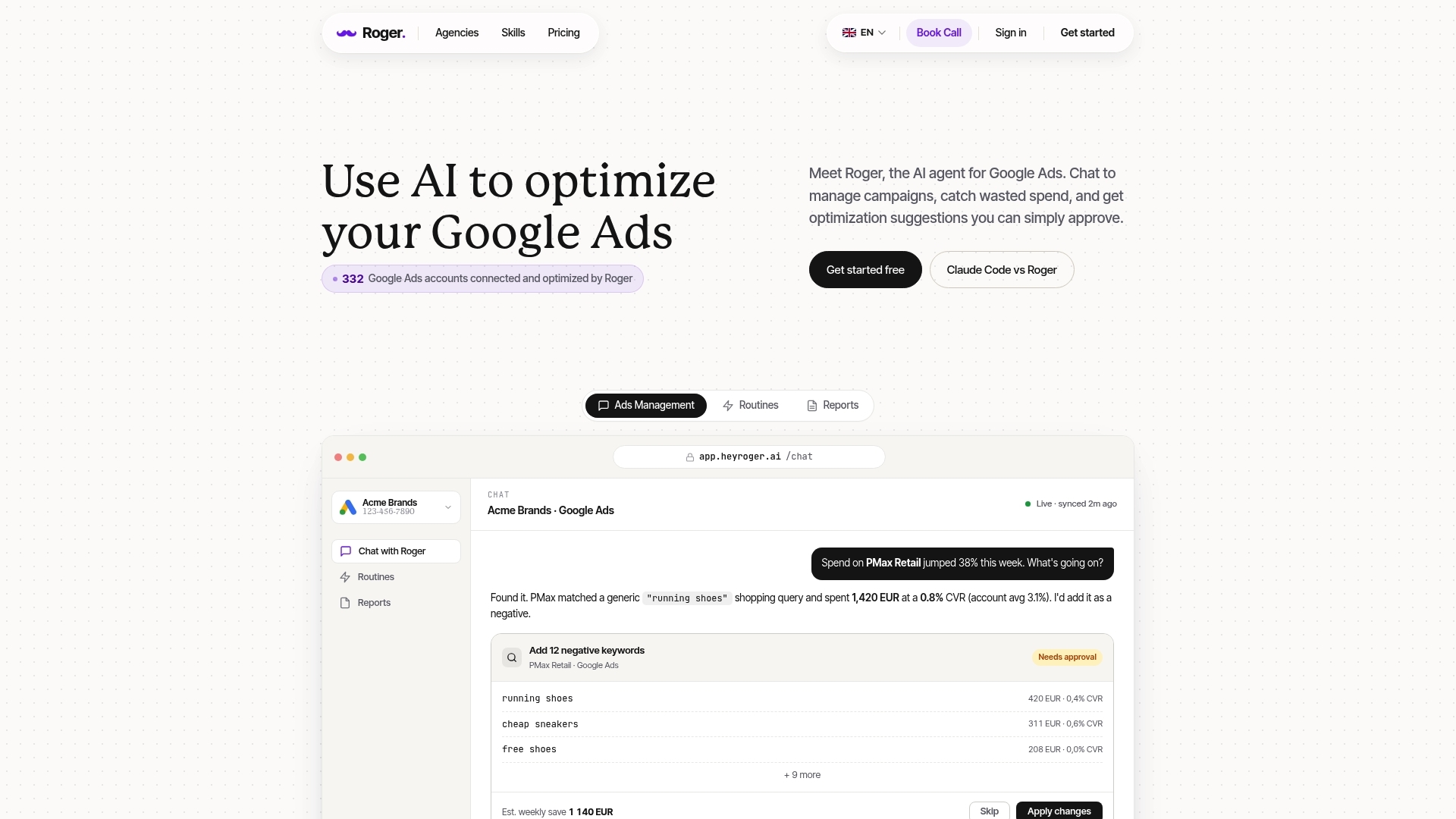
Permission scope matters because Roger works as an AI agent that proposes changes and waits for you to approve them. By default, you connect Roger to Google Ads with read-only access, so it can analyze performance and draft actions without pushing edits live.
Roger’s workflow is simple: connect data sources, let the agent inspect the account, then review a queue of drafted optimizations. You decide what goes live, when, and for which campaigns.
- Connect your accounts: link Google Ads (including MCC), and optionally Google Analytics 4 and Google Tag Manager for better conversion context.
- Set guardrails: choose what Roger can monitor continuously, what it can draft for approval, and what it should never touch (for example, brand campaigns or high-stakes budgets).
- Run audits and routines: Roger checks common waste patterns like irrelevant search terms, inefficient keywords, landing page mismatches, and budget allocation issues.
- Review drafted changes: Roger prepares concrete edits such as negative keyword suggestions, bid adjustments, pausing low-quality keywords, and cleanup tasks. You approve, edit, or reject each item.
- Monitor 24/7: anomaly detection watches for spend spikes, sudden conversion drops, tracking issues, and CPC jumps so you catch problems the same day.
- Generate reports: Roger produces weekly or monthly performance reports you can share via link or export to PDF.
Approval-First Change Control And EU/GDPR Alignment
Roger’s approval-first model fits teams that need governance. It reduces the risk of “silent” automation changes that break account strategy, especially in regulated industries or when multiple stakeholders share an MCC.
On the data side, Roger uses GDPR-aligned EU data residency and supports one-click revocation. If you remove access, Roger stops pulling data. Roger also states it deletes data within 30 days and has CASA Tier-2 audited security, which matters if you evaluate vendors through procurement or security review.
For Google’s baseline on roles and access control, see Google Ads access levels.
Optmyzr vs Adalysis vs Roger: Feature-by-Feature Comparison Table
Google Ads access levels matter because these tools differ on change control. Some default to recommendations you approve, others run automations you configure and maintain.
| Category | Roger | Optmyzr | Adalysis |
|---|---|---|---|
| Primary Strength | AI agent for audits, monitoring, drafted optimizations, and narrative reporting | PPC operations toolkit with deep workflows, rules, and scripts for power users | Search ads testing and ad hygiene system with structured experiment workflows |
| Audits And Account Hygiene | Automated audits that surface waste and missed best practices, written in plain language | Strong one-click optimizations and audits across many areas, highly configurable | Strong for ad-level and testing-related checks, less focused on broad automation |
| Automations And Change Control | Approval-first changes, read-only by default, guardrails for what can run | Rule-based automations you set up and tune, can scale across accounts | Automation centers on test cadence and ad hygiene, fewer bid or budget automations |
| Scripts And Rules | Routine-based monitoring and actions, less script-centric | Script support and rule frameworks are a core part of the product | Rules focus on ad testing policies and RSA coverage, not general scripting |
| Experiments And Testing | Helps identify what to test, not a dedicated experiment management suite | Supports testing workflows, not as specialized as Adalysis | Core feature: manage A/B tests, track significance, enforce testing discipline |
| Search Terms And Negatives | Draft negative keywords for approval and explain why they matter | Tools to mine search terms and apply negatives, usually more manual setup | Can support query review, usually secondary to ad testing focus |
| Reporting | Auto-generated weekly or monthly reports with commentary, share link or export PDF | Custom reporting and insights for managers who like building dashboards | Reporting centers on tests and ad performance diagnostics |
| Alerts And Monitoring | 24/7 monitoring for anomalies and waste patterns, with context and suggested fixes | Alerts exist, but quality depends on how you configure rules and thresholds | Alerts focus on testing hygiene and ad issues |
| Collaboration And Governance | Approval workflow fits teams that need review trails and safer permissions | Great for ops teams, governance depends on internal process and access | Good for teams with a formal testing process and shared standards |
| Setup Time In Practice | Fast if you want guided audits and drafted actions, slower if you define many guardrails | Fast to connect, time goes into building and maintaining automations | Fast if your goal is testing discipline, time goes into structuring experiments |
If you want the tool to do work without surprising stakeholders, prioritise approval-based change control. If you want maximum control and are willing to maintain rules, Optmyzr usually fits better. If your bottleneck is creative testing throughput and RSA hygiene, Adalysis stays focused on that job.
Which Tool Fits Your Workflow: Agency, In-House, or Freelancer?
The right choice depends on who has to live with the workflow: an agency standardising across many accounts, an in-house team managing approvals, or a freelancer trying to buy back hours.
Agency Workflow (Multi-Account Ops)
Agencies usually win by enforcing consistent routines across an MCC and reducing “did we check that?” work.
- Choose Optmyzr if you run many accounts and you want configurable optimisation workflows (rules, scripts, one-click optimisations) that experienced PPC managers can tune per client.
- Choose Roger if you want an agent that drafts account-specific actions and reporting, then routes everything through approval so juniors can execute without pushing risky edits live.
- Choose Adalysis if your agency sells testing as a deliverable and you need a system of record for RSA hygiene and experiment management across clients.
Agency reality check: Optmyzr rewards teams who document standards and maintain automations. Roger rewards teams who want fewer moving parts and tighter change control.
In-House Workflow (Governance And Stakeholders)
In-house teams deal with approvals, brand constraints, and “who changed what?” questions.
- Choose Roger if you need approval-first changes, guardrails around sensitive campaigns (brand, regulated categories), and fast stakeholder reporting without spreadsheet work.
- Choose Optmyzr if you have a dedicated PPC owner who wants to build repeatable processes and you can support ongoing rule maintenance.
- Choose Adalysis if your biggest internal argument is creative performance and you need disciplined ad testing and RSA asset coverage.
Freelancer Workflow (Time Saved Per Week)
Freelancers usually want fewer tabs, fewer audits, fewer “I missed that spike” moments.
- Choose Roger if you want monitoring, drafted negatives, and client-ready reports with minimal setup, then approve changes in batches.
- Choose Optmyzr if you enjoy building a personal playbook of automations and you manage enough spend to justify deeper configuration time.
- Choose Adalysis if you mainly run Search and your retention depends on steady testing velocity and ad quality checks.
The Hidden Cost Test: Where AI PPC Tools Save Time (and Where They Create Work)
“Fewer tabs” is easy to promise. The real question is whether the tool removes work, or shifts it into new chores like alert triage, rule maintenance, and approvals.
Use this checklist as a quick “automation tax” test before you roll a tool across an MCC.
- Alert volume vs actionability: If you get 30 alerts and fix 2 things, you built a new inbox. Good monitoring explains the driver (tracking break, budget cap, query spike) and points to the exact campaign, time window, and change history.
- False positives from normal volatility: Search campaigns swing by day-of-week, promo calendars, and learning phases. If you constantly mute alerts, your thresholds are wrong or the tool lacks context like seasonality and conversion lag.
- Rule babysitting: Rule-based systems save time after you tune them. Before that, you spend hours on guardrails: exclusions for brand, new product launches, low-volume campaigns, and client-specific KPIs (tROAS vs CPA). Optmyzr power users often accept this trade because the control is the point.
- Approval queues that never clear: Approval-first tools reduce risk, but they can create a backlog if nobody owns review. Set an SLA (for example, review drafts daily at 09:00) and define what can auto-run safely (like pausing disapproved ads) versus what always needs a human (like budget moves).
- Negative keyword “collisions”: Automated negatives can block valuable long-tail queries, especially in B2B where intent is subtle. Require a reason for each negative and review conflicts with existing keyword themes.
- Reporting overhead in disguise: Auto-reports save time only if they answer stakeholder questions. If you still copy charts into Slides and write commentary, the tool is a data exporter, not reporting automation.
How The Three Tools Tend To Shift Work
Roger usually reduces rule maintenance because it drafts actions for approval and focuses on monitoring, audits, and narrative reporting. You still pay an approval cost, so teams need a clear reviewer.
Optmyzr often saves the most time at scale after you standardize playbooks, but you “pay” in ongoing rule tuning and exceptions management.
Adalysis saves time when testing discipline is the bottleneck. You spend less time policing RSA coverage and experiment cadence, and more time deciding what to test next.
FAQ: Pricing, Safety, Setup Time, and Switching Tools
Testing discipline is easy to buy, governance is harder. Before you pick Roger vs Optmyzr vs Adalysis, get clear on pricing drivers, permission scope, and what “switching” really means in Google Ads.
FAQ
How do these tools usually price?
Pricing typically scales with account volume and complexity: number of Google Ads accounts under an MCC, managed ad spend tiers, and feature tiers (reporting, automations, collaboration). Optmyzr and Adalysis generally price like operations platforms. Roger offers a free plan with no card required, then paid plans based on usage and team needs.
What is the safest permission model?
Read-only access is the safest default because the tool can analyze without pushing edits. When you need changes applied, prefer approval-first workflows where a human reviews every proposed edit. Google documents account access levels in its Google Ads access and security guide.
Can these tools make changes without me?
Yes, depending on configuration. Optmyzr can run rule-based automations you set up. Adalysis focuses automation around testing and ad hygiene. Roger drafts optimizations and waits for approval, and it supports guardrails so sensitive areas (brand, high-budget campaigns) stay protected.
How long does setup take in practice?
Connection takes minutes. Real setup is governance: naming conventions, alert thresholds, automation scope, and who approves what. Expect the fastest time-to-value when you start with one routine (search terms cleanup or anomaly monitoring) before expanding.
Is switching tools risky?
Switching rarely “breaks” Google Ads because these tools sit on top of your account. The risk is operational: duplicated alerts, two systems applying overlapping rules, and teams losing their audit trail. Run a 2 to 4 week overlap where only one tool has write access, then remove the other tool’s access.
What should I verify before procurement signs off?
Ask for permission scope, audit logs, revocation flow, data residency, and data deletion timelines. For Roger, the checklist includes read-only by default, one-click revocation, GDPR-aligned EU data residency, and data deleted within 30 days.
If you are torn, pick based on where you lose hours today: rules maintenance (Optmyzr), experiment throughput (Adalysis), or approval-safe audits, monitoring, and reporting (Roger). Then pilot it on one account this week and measure time saved per cycle.
