
If your Google Ads account can burn through a week’s budget by Tuesday, a reporting-only tool won’t save you. You need something that spots the leak fast, tells you what caused it, and suggests a fix you can approve with confidence.
That’s where many teams outgrow Adriel. Adriel is solid for data aggregation, scheduled reports, and client-ready visuals. The pain starts when the work shifts from “show performance” to “improve performance”: search terms that quietly waste spend, pacing that drifts until month-end, and audits that turn into another spreadsheet you never finish.
This guide helps you pick an Adriel alternative built for optimization-first workflows. You’ll see which tools go deeper on Google Ads audits and monitoring, which ones keep automation on a tight leash with approvals and access control, and which ones are best when reporting is the main job.
Quick Comparison Table: 5 Adriel Alternative Tools
Optimization-first workflows live or die on guardrails and monitoring speed. This table compares five popular adriel alternative options on what matters day-to-day: how deep they go into Google Ads optimization, how safely they automate, how quickly they alert you, and how client-ready the reporting looks.
| Tool | Optimization Depth | Automation Guardrails | Alerts And Monitoring | Reporting Output | Integrations | Security And Privacy |
|---|---|---|---|---|---|---|
| Roger | AI audits, wasted spend detection, optimization drafts (negatives, bids, budgets) for approval | Read-only by default, approval-based changes, revoke access | Anomaly and spike monitoring, scheduled routines | Weekly and monthly narratives, share link, PDF export | Google Ads and MCC, GA4, Google Tag Manager | GDPR-aligned EU data residency, access controls, data deleted within 30 days, CASA Tier-2 audited |
| Optmyzr | Deep PPC workflows: audits, recommendations, rule-based optimizations, scripts | Rules and scripts can change accounts quickly, teams often add internal QA and approval steps | Performance monitoring and alerts (varies by configuration) | Scheduled reports and dashboards | Google Ads, Microsoft Advertising and more (depends on plan) | Enterprise-style access management (check your required controls) |
| Adalysis | Systematic optimization focused on testing and account hygiene (ads, assets, search terms) | Workflow-driven recommendations, change control depends on how you implement actions | Alerts around testing and performance signals | Client-facing reports for experiments and account changes | Google Ads and Microsoft Advertising | Standard SaaS security expectations (validate for your compliance needs) |
| Google Ads Scripts | Unlimited if you build it, from bid rules to query mining | You own the guardrails, a bad script can push bad changes at scale | You must build alerts (email, Slack, logging) and monitor failures | You must build reporting (Sheets, BigQuery, Looker Studio) | Google Ads, plus whatever you connect via APIs | Security depends on your code, access model, and key management |
| Looker Studio | Reporting-first, no native optimization engine | No change automation for Google Ads | Limited, you can approximate monitoring with scheduled emails and charts | Dashboards, share links, scheduled delivery | Google Ads, GA4, BigQuery, partner connectors | Google account-level sharing and permissions |
If your main pain is reporting and dashboards, Looker Studio covers the basics. If your pain is missed issues, wasted spend, and repetitive account work, prioritize an adriel alternative that pairs audits with monitoring and approval-based change control.
1. Roger
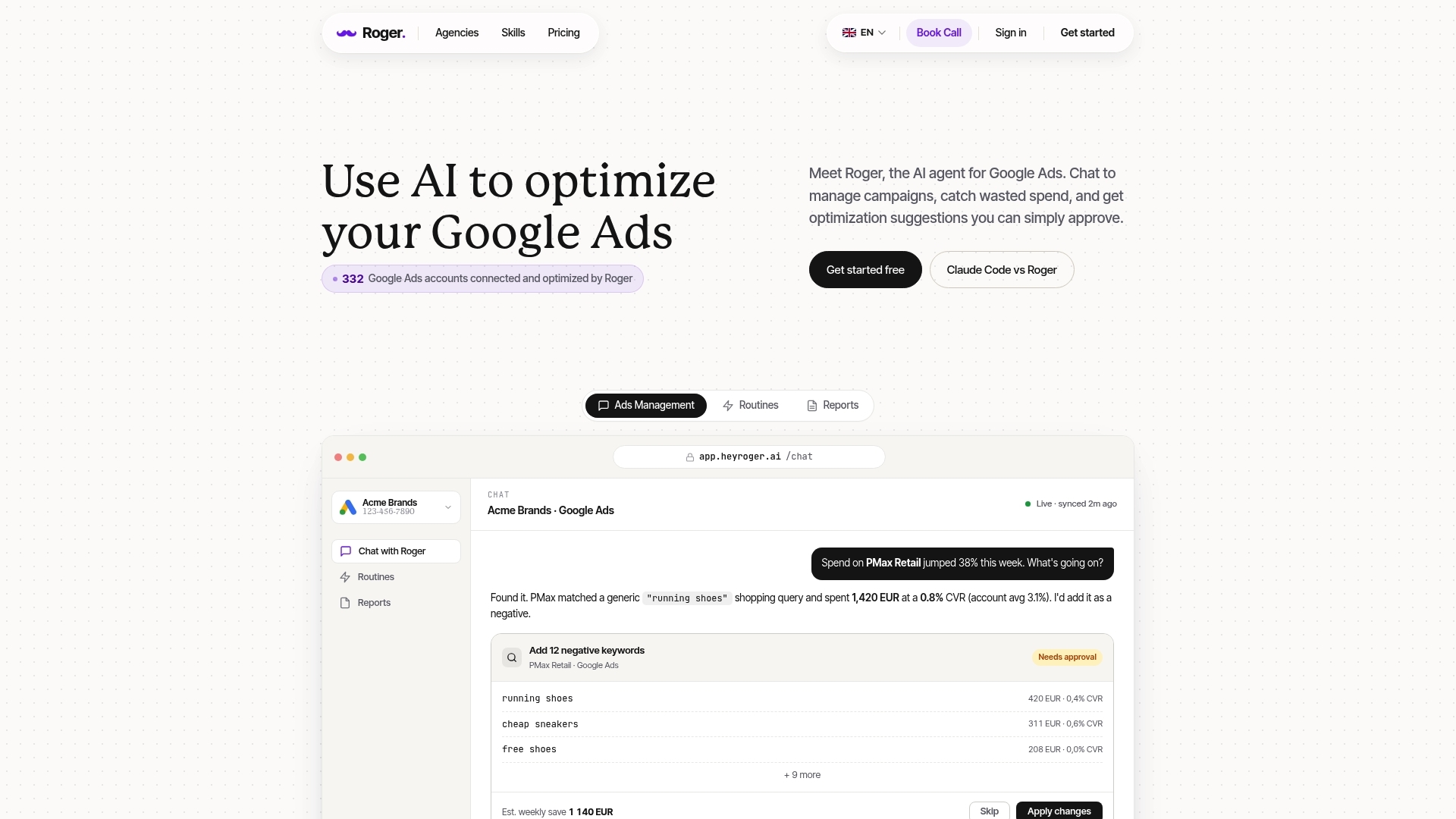
If missed issues and wasted spend are the real problem, Roger is an adriel alternative built for optimization-first Google Ads work, with reporting as an output of the same analysis. Roger connects to Google Ads (including MCC) and runs audits, monitoring routines, and report generation from one place.
Roger starts with an account audit that flags common waste patterns: search terms that do not match intent, campaigns that burn budget without conversions, and settings that quietly drag performance (like mismatched locations or weak ad-to-keyword alignment). Instead of dumping a checklist, Roger turns findings into specific drafts you can review.
Approval-Based Optimization With Guardrails
Roger is read-only by default. When you ask for changes, Roger prepares proposed actions and waits for explicit approval. That matters for agencies and in-house teams that need change control, client sign-off, and a clean audit trail.
- Wasted spend detection: highlights inefficient spend drivers and where to investigate first.
- Negative keyword drafts: proposes negatives from search term patterns, so you can block irrelevant traffic without over-filtering.
- Bid and budget suggestions: drafts adjustments based on pacing and performance signals, then routes them for approval.
- Scheduled routines: runs repeatable “health checks” across accounts, so you stop redoing the same manual QA every week.
Roger also runs anomaly monitoring, so you hear about spend spikes, conversion drops, or pacing drift while there is still time to react. This is where reporting-first tools usually fall short: they show what happened after the fact.
For client-ready output, Roger generates weekly or monthly summaries with plain-language explanations, plus share links and PDF export. On the compliance side, Roger uses GDPR-aligned EU data residency, supports one-click access revocation, and deletes data within 30 days. Roger also states CASA Tier-2 audited security, which matters when you connect to Google Ads data.
2. Optmyzr
If you want an adriel alternative that feels like a power tool for PPC operators, Optmyzr is usually on the shortlist. Optmyzr focuses on hands-on Google Ads optimization workflows: audits, bulk actions, rule-based optimization, and a deep library of scripts and “one-click” recommendations that speed up routine account work.
Optmyzr works best for teams that already know what “good” looks like in an account and want faster execution. You use Optmyzr to surface issues (like weak ad groups, keyword bloat, budget distribution problems, or missing negatives), then apply fixes in bulk across campaigns or accounts. Agencies like it because the same workflow repeats cleanly across many clients.
Where Optmyzr Shines As an Adriel Alternative
- Audits and checklists: account-level diagnostics that translate into a task list you can work through.
- Rule-based automation: scheduled rules for actions like pausing items that break your thresholds, adjusting bids, or reallocating budget.
- Scripts and enhancements: Optmyzr’s script ecosystem helps automate query mining, labeling, and other repetitive maintenance.
- Bulk optimization workflows: faster changes across many campaigns, especially for search and shopping accounts.
The tradeoff is change control. Rules and scripts can push a lot of edits quickly, across many accounts, which is great until a threshold is wrong or tracking breaks and the automation reacts. Teams that need stricter guardrails usually add process outside the tool.
Practical guardrails that work in real PPC teams:
- Run new rules in “preview” or reporting mode first, then apply after QA.
- Limit who can publish changes; use separate roles for analysis vs execution.
- Set caps and exclusions (brand campaigns, high-value SKUs, experimental campaigns).
- Log every automated change in a shared Google Sheet or ticket in Jira.
If you prefer approval-based changes by default, an optimization-first AI agent like Roger fits that operating model better. Optmyzr fits teams that want speed and are comfortable building their own review layer.
3. Adalysis
Teams that want a repeatable review layer across many accounts often pick Adalysis as an adriel alternative. Adalysis focuses on systematic Google Ads optimization: keeping accounts clean, keeping tests running, and making sure routine checks happen the same way every time.
Adalysis is strongest when your bottleneck is process discipline. If your agency manages 20, 50, or 200 accounts, the hardest part is consistency: search term hygiene, ad and asset coverage, and catching “quiet” issues that accumulate over weeks.
Where Adalysis Fits Best for Agencies
Adalysis works well as a central place to manage ongoing optimization tasks across clients, especially when you need to prove to clients that you test methodically and maintain the account.
- Testing workflows: helps you run structured ad testing and track progress, so experiments do not stall mid-flight.
- Account hygiene checks: surfaces common maintenance items, such as search terms that need attention, weak ad group coverage, or settings drift.
- Change documentation: supports client-facing reporting around what changed and why, which matters when you report outcomes monthly.
- Multi-account operations: agency teams can apply consistent routines across accounts instead of relying on each PPC manager’s personal checklist.
The tradeoff is change control. Adalysis can guide actions and standardize what your team looks at, but you still need to decide how edits get approved and applied. Agencies usually solve this with internal QA steps, a “review then apply” policy, and clear permissions in Google Ads and Google Ads Manager Accounts (MCC).
If your main goal is tighter testing discipline and cleaner accounts across many clients, Adalysis is a solid optimization-first option. If you want the tool to draft optimizations and hold them for explicit approval with read-only access by default, you will usually prefer an AI agent approach, like Roger, for day-to-day execution control.
4. Google Ads Scripts
If you want maximum control, Google Ads Scripts can be the most flexible adriel alternative on the market. Scripts run inside Google Ads and let you automate almost anything you can express in code: labeling, bid adjustments, budget pacing, search term mining, and guardrails like pausing keywords after a tracking failure.
Scripts beat platforms when your workflow is specific and repeatable, and you cannot find it as a built-in feature anywhere else. They also work well when procurement blocks new SaaS tools, or when you want the logic to live in your own repo instead of a vendor UI.
When Google Ads Scripts Are The Right Adriel Alternative
- You need custom rules that match your business model (for example, different CPA targets by margin tier or inventory level).
- You want account-specific automation across an MCC, with your own naming conventions and labels.
- You already have a data stack like Google Sheets or BigQuery and want scripts to push data and actions into it.
- You want deterministic behavior over AI recommendations, especially for regulated industries or strict brand rules.
The downside is that scripts shift the burden from vendor to you. A script can change thousands of entities in minutes. If the logic is wrong, the damage scales just as fast.
Plan for these risks up front:
- Maintenance: Google Ads features change, naming conventions drift, and scripts break quietly unless you watch logs.
- QA and rollout: test in a low-spend campaign first, then expand. Use preview modes where possible and keep a rollback plan.
- Accidental changes: avoid “write” permissions for day-to-day users. Separate the author from the publisher and require peer review in GitHub.
- Alerting gaps: build failure notifications (email or Slack via webhook) and track runs, otherwise you find out weeks later.
If your team wants automation with safer defaults, approval workflows and read-only access by default reduce the blast radius compared with DIY scripts.
5. Looker Studio
Looker Studio is the cleanest choice when your main requirement for an adriel alternative is reporting: dashboards, share links, and scheduled delivery that stakeholders can open without learning a new tool. It is free, it lives in the Google ecosystem, and it works well for “show me performance” conversations. It does not run Google Ads optimization, and it will not protect you with approval-based change control because it does not make changes at all.
Teams usually pair Looker Studio with Google Ads for top-level pacing and outcomes, GA4 for on-site behavior, and BigQuery when they need durable storage and custom modeling. For agencies, it also works as a template system: you build one dashboard per service line (search, shopping, PMax), then duplicate it per client and swap data sources.
Where Looker Studio Fits (And Where It Breaks)
Looker Studio fits when you want consistent, client-friendly reporting without paying for a reporting platform. It breaks when you expect the tool to notice problems early and turn them into actions.
- Great for: executive dashboards, weekly snapshots, month-end performance packs, and a single view across Google Ads and GA4.
- Weak at: continuous monitoring (spend spikes, conversion drops, tracking breaks), anomaly detection, and anything that resembles an optimization workflow.
- Manual by default: search term mining, negative keyword proposals, budget reallocation, and bid adjustments still happen in Google Ads or a separate optimization tool.
If you go this route, keep the scope honest: use Looker Studio to communicate outcomes, then use an optimization-first system for audits, wasted spend detection, and approval-based recommendations. That is where AI agents like Roger earn their keep: they watch accounts continuously and draft changes for review instead of waiting for your next reporting cycle.
Actionable next step: open your current report and list the top five questions clients ask every month. If Looker Studio can answer them with stable data sources, keep it as your reporting layer and shortlist an adriel alternative for monitoring and optimization work.
